How Power Apps Enterprise Risk Register Cut Risk Assessment Turnaround by 67% for a Child Welfare Agency

Most risk registers fail quietly. Risks get logged, but nothing forces anyone to review them on a schedule that matches how dangerous they actually are. When a Canadian child welfare agency came to Code Creators, they needed exactly that: a system where a risk’s own severity, not a person’s memory, decides how fast it gets assessed and how often it gets reviewed. We built them a enterprise risk register Model-Driven Power Apps on Dataverse. Average assessment turnaround dropped from 27 days to 9, and on-schedule reviews for Critical and High risks climbed to 98.6%.
Executive Summary
Our client is a Canadian child welfare agency, coordinating case management, compliance, and community services across multiple municipalities. Before working with Code Creators, they tracked organizational risk manually across a set of disconnected spreadsheets. Risks got logged, but nothing enforced when they should be looked at again, and a critical risk could sit unreviewed for months alongside a low-priority one with no system distinguishing the two.
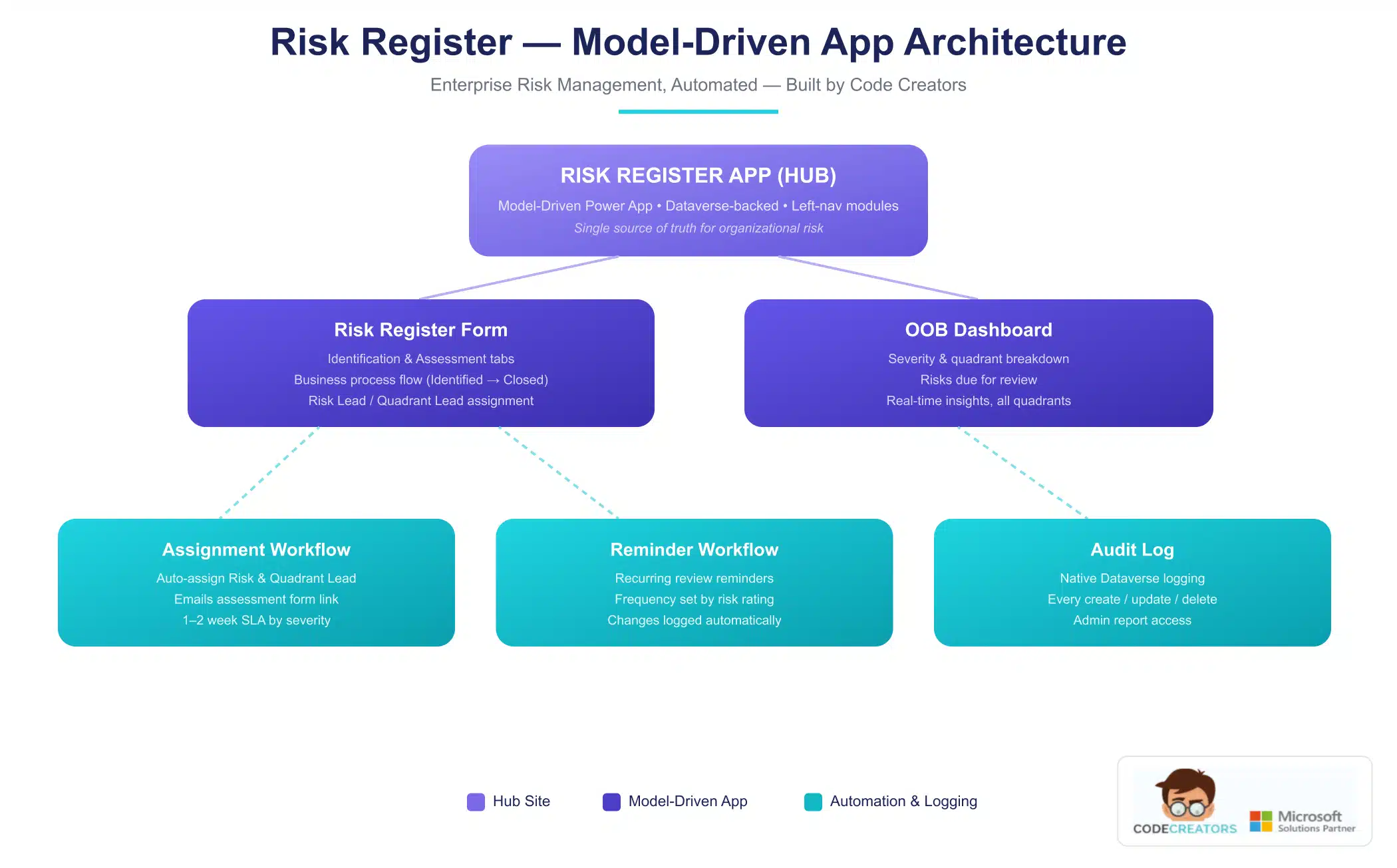
Code Creators built them a Model-Driven Power App Risk Register on Dataverse, where the core idea is simple: the risk’s own calculated score determines its treatment. A 1 to 25 rating, built from Likelihood times Impact, decides both how fast a new risk must be assessed and how often it gets reviewed afterward, all enforced automatically through Power Automate. This is enterprise risk management automation in practice: a system that enforces its own review cadence instead of depending on someone remembering to check.
Results At A Glance
- 67% faster average risk assessment turnaround (27 days to 9 days)
- 83% reduction in monthly board-reporting prep time (6.5 hrs to 1.1 hrs)
- 98.6% of Critical and High risks now reviewed on schedule, up from an estimated 38%
- 5 spreadsheets consolidated into 1 unified risk register
- 100% of rating changes automatically logged for audit
About the Client
Our client is a Canadian child welfare agency operating within Ontario’s child protection sector, coordinating services across multiple municipalities under provincial regulatory oversight. Organizations in this sector carry a distinctive risk profile. A missed compliance deadline, a workforce shortage in frontline case management, or a data breach involving a child’s case file all carry consequences that go well beyond a typical operational hiccup. For a nonprofit, compliance tracking cannot be an afterthought; funders and boards expect to see it happening on a schedule, not reconstructed after the fact.
The agency’s risk landscape spans four broad areas:
- Strategic and reputational exposure.
- Compliance and legal obligations.
- Day-to-day operational and workforce risk.
- Financial and resourcing pressure.
This puts the agency’s risk profile squarely within a standard enterprise risk management (ERM) framework, covering strategic, compliance, operational, and financial exposure. Compliance tracking sits alongside operational and financial risk as one of the four areas the agency has to monitor continuously. Of those, operational and people risk turned out to be the largest single category, reflecting the reality of a frontline service organization where staffing, case continuity, and service delivery are constant, active concerns rather than background considerations.
With a workforce ranging from frontline case workers to program leads and executive leadership, the agency needed a system that non-technical staff could use directly, without pulling in IT every time a new risk needed logging or a review came due. The result is a Dataverse risk register that gives every risk lead the same starting point, instead of a different spreadsheet version for every department. Given the sensitivity of the sector, there was no room for a missed review to slip through unnoticed.
The Problem
Before this project, risk assessments at the agency had no enforced timeline and no system-driven review cadence. A risk was only reviewed if someone happened to remember to review it.
That created three concrete problems:
No Consistent Assignment
There was no single place where a risk’s category or type reliably determined who was responsible for assessing it, so accountability varied case by case. Every new entry starts with a risk quadrant assignment, which is what determines who gets notified and how the entry gets reported on later.
No Enforced Review Frequency
Two risk leads scoring the same risk the same way could end up on completely different review schedules, or on no schedule at all, because nothing in the process connected a risk’s severity to how often it needed a second look.
No Audit Trail
When a risk’s rating changed, there was no structured record of what changed or why, which made it hard to show a board or funder that governance was actually happening on schedule rather than on an ad hoc basis.
Left unaddressed, the risk was straightforward: a Critical risk and a Low risk could receive the same review cadence, or worse, no review cadence at all. For an organization where a missed risk can mean a missed safeguarding concern, that gap was not acceptable.
What We Discovered
Working through discovery with the agency’s leadership and risk leads, the core diagnostic question was not “what fields does this need.” It was “what should the score actually control.” That distinction shaped everything that followed.
We mapped their informal process against what a scoring-driven system would need to enforce, and landed on a four-tier model:
That four-tier structure became the agency’s risk scoring model, turning a subjective judgment call into a consistent, repeatable calculation.
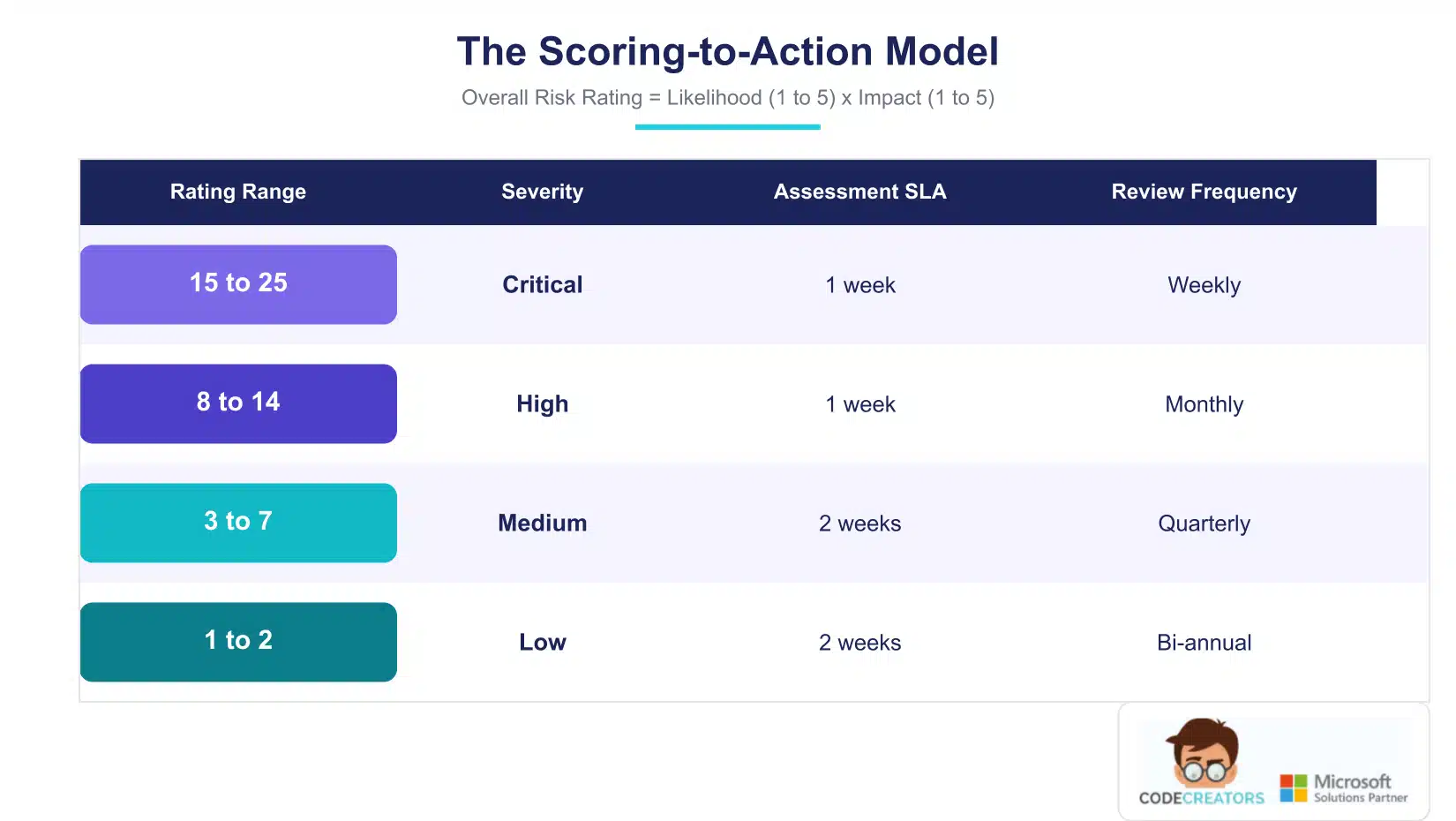 Two things about this model are worth understanding. First, the assessment window is binary, one week or two, but the review cadence is four-tiered. Getting the first assessment done quickly only matters at the top two severity levels; Critical and High share the same one-week window. But once a risk is known, the ongoing monitoring cadence needs finer granularity, because over-reviewing a low-risk wastes reviewer time, while under-reviewing a Critical one is a real exposure. Review frequency automation is really the core of the whole system; nothing about the review schedule depends on a person remembering it.
Second, we treated the initial assessment and the ongoing review as two separate behavioral problems, each with its own reminder logic, rather than one generic notification system. A brand-new risk needs urgency; a known risk needs consistency.
The Solution
Objective
Turn that scoring-to-action model into a system that runs itself, without a program manager manually chasing down reviewers.
Why Dataverse Over a Simpler SharePoint-List Build
A SharePoint list can hold the same fields, but it cannot natively drive a visual business process flow, table-level audit logging, or the calculated-field logic needed to make the score genuinely control the workflow. For an organization where auditability is a governance requirement rather than a nice-to-have, that ruled Dataverse in from the start. This is a pattern common across Model-Driven Power Apps built for governance-heavy environments: structure the data first, then let the platform enforce the process.
What We Built
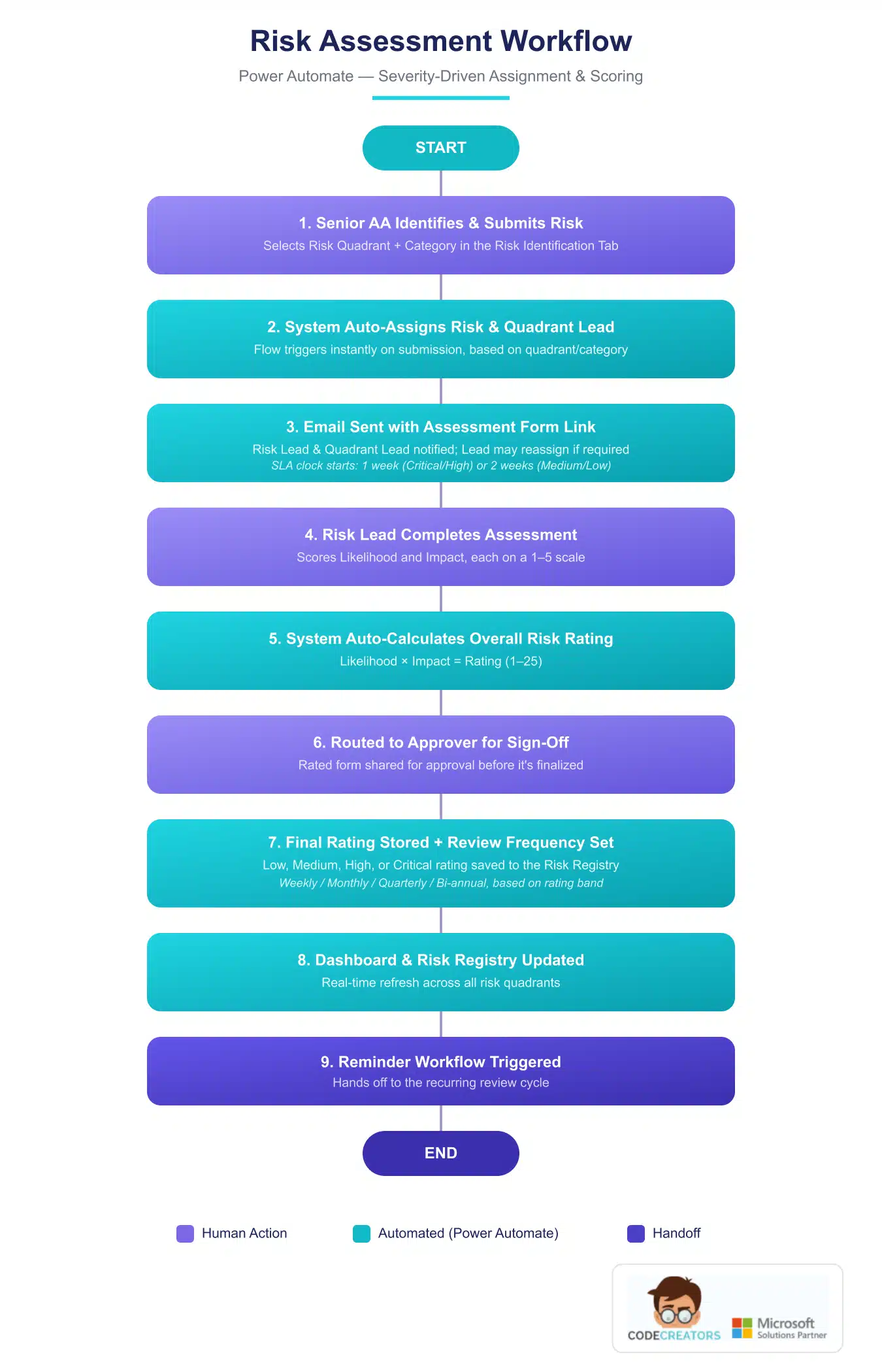
The Risk Assessment Workflow, built in Power Automate, is what actually enforces the model. It auto-assigns a Risk Lead based on quadrant and category, emails the assessment link, and starts the SLA clock the moment a risk is submitted.
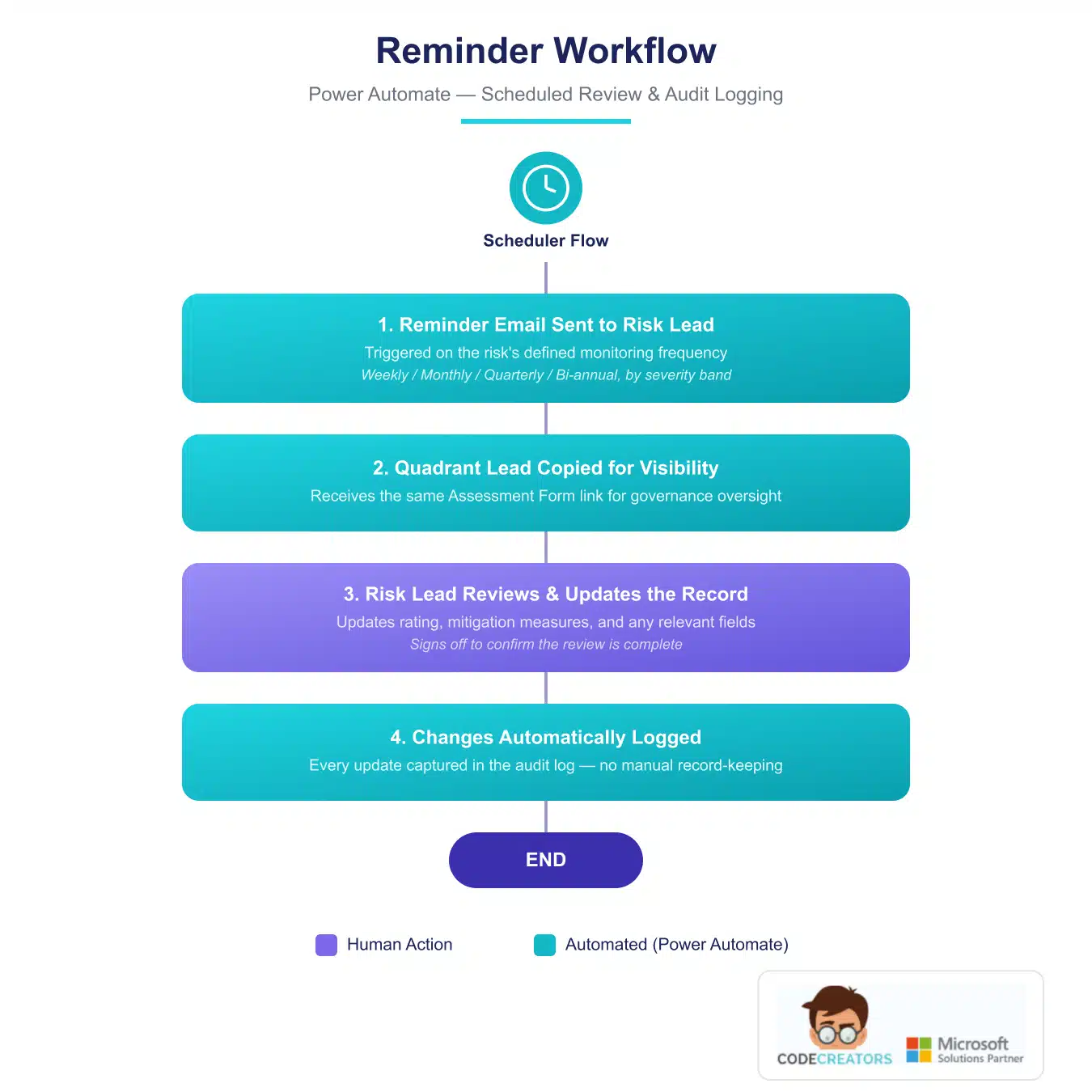
 The Reminder Workflow takes over from there, triggering on the risk’s monitoring frequency, notifying the Risk Lead and copying the Quadrant Lead for visibility, and logging every review automatically.
 A risk register dashboard, built entirely on standard out-of-the-box charting, gives leadership a real-time view of total risks, severity distribution, and quadrant breakdown without opening a single spreadsheet. Leadership works from an out-of-the-box dashboard rather than a custom-built one, which keeps the system easier to maintain long term. And underneath all of it, native Dataverse audit logging captures every create, update, and delete, with no custom development required. Every change is written to the audit log automatically, so there is always a record of who changed a rating and when
Challenges Overcome
Risks that Span More Than One Category
Some risks legitimately touch more than one quadrant. A data-quality issue, for example, is both an operational concern and arguably a compliance one. A rigid one-quadrant-per-risk model would have forced arbitrary categorization on the agency’s staff. We solved this by allowing multi-quadrant classification at the category level, while still generating a single, clear assignment path so a risk never triggers duplicate or conflicting notifications.
Matching Leadership’s Vision to What the Actually Supports
Agency leadership initially wanted a true risk heat map on the dashboard. The out-of-the-box charting components available in a model-driven app do not include a native heatmap widget. Rather than scope custom development that would sit outside what the agency’s own team could maintain going forward, we designed a simplified severity-by-quadrant grid using standard chart types, agreed on early in the project rather than discovered as a gap at the end.
Lesson Learned
The lesson in both cases is the same: decide early which parts of the vision need to be built exactly as imagined, and which can be solved within the platform’s native limits. That decision has real consequences for cost, timeline, and who can maintain the system once you leave.
Results & Business Impact
The agency now runs on a system where severity, not memory, decides what happens next. That shows up in the numbers below.
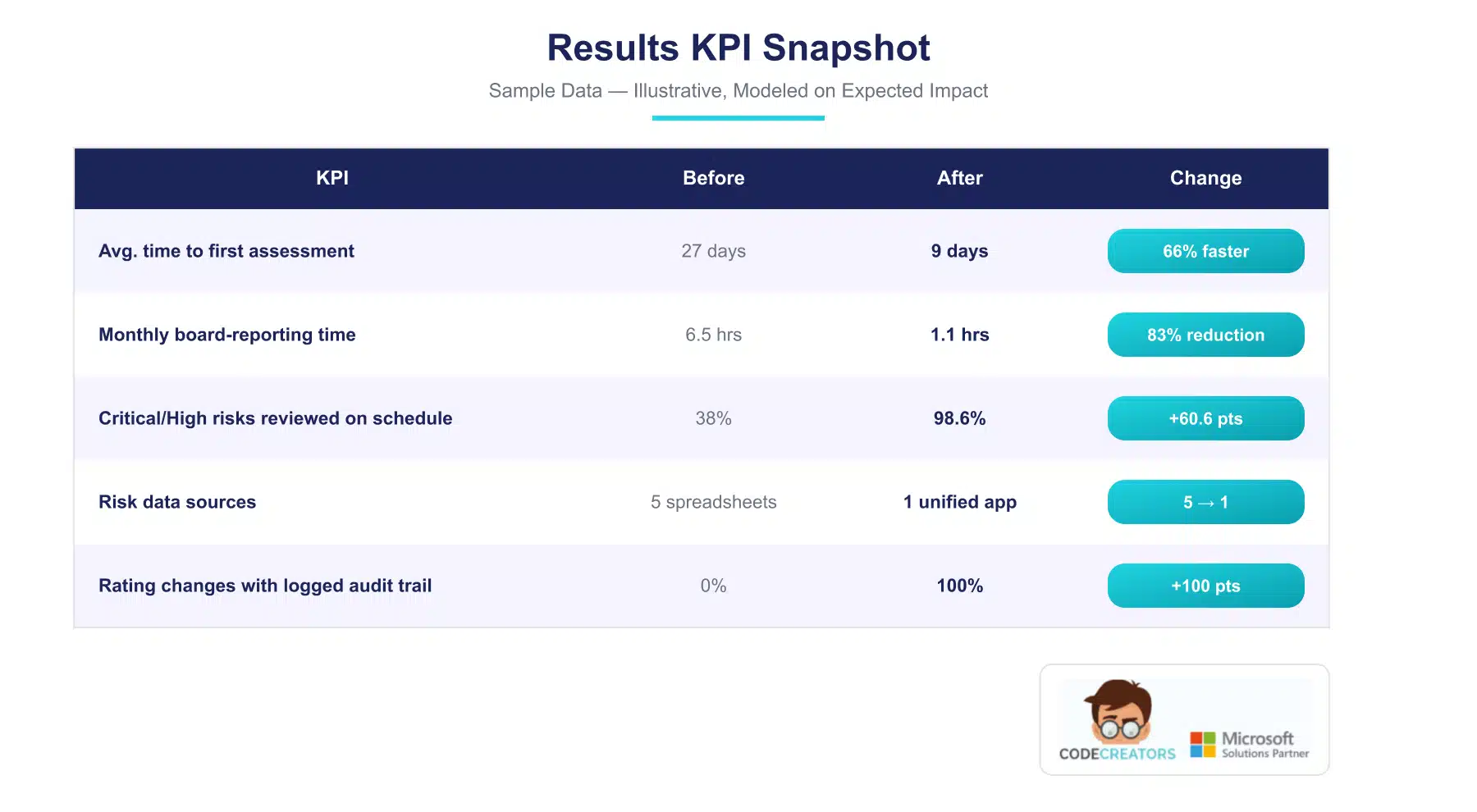 The consolidation matters as much as the speed. Leadership went from reconciling five separate spreadsheets before every board meeting to pulling a live dashboard view, and every rating change now carries its own audit record automatically, which means the agency can show a funder or auditor exactly when a risk was reviewed and what changed, without reconstructing the history by hand.
The change in day-to-day behavior is just as significant as the numbers themselves. Risk leads no longer need a program manager checking in to ask whether a review is overdue; the system tells them, and the assessment window tied to each risk’s severity means nobody has to guess how urgent a new entry actually is. That shift, from a process that depended on individual diligence to one the platform enforces on its own, is what made the faster turnaround and higher on-schedule review rate possible in the first place. It is also the part most likely to hold up over time, since it does not rely on any one person staying consistent.
There is a governance benefit here too, beyond the raw efficiency gain. Boards and funders in the child welfare sector expect to see evidence that risk is being actively managed, not just recorded. With every assessment bound to a defined SLA and every rating change logged automatically, the agency can now answer questions about its own risk oversight with a live report rather than a reconstructed timeline, which changes the nature of that conversation from defensive to routine.
Client Testimonial
“What we needed wasn’t just a place to log risks; it was a system that would tell us, on its own, when something needed attention. That’s exactly what this does. Our leadership team finally has real-time visibility into what’s happening across the organization, not a snapshot from whenever someone last updated a spreadsheet.”
Celine Joe – Director of IT Operations
Frequently Asked Questions
A single fixed review cadence either over-reviews low-severity risks, wasting reviewer time, or under-reviews high-severity ones, creating real exposure. Tying frequency to a calculated score, as this build does across four bands from weekly to bi-annual, keeps attention proportional to actual risk.
Likelihood and Impact are each scored 1 to 5 and multiplied together, producing a rating from 1 to 25 that maps to Low (1 to 2), Medium (3 to 7), High (8 to 14), or Critical (15 to 25).
Yes. Assignment and reminder workflows that trigger automatically and route to specific people depend on Power Automate Premium connectors, alongside Power Apps Premium licensing for end users.
Yes, though structural changes to categories, quadrants, or the scoring logic should go through a change-management process, since they affect how existing data is classified and reported on.
In a well-designed system, Critical risks warrant weekly review, High risks monthly, Medium risks quarterly, and Low risks bi-annually. A single blanket schedule for every risk regardless of severity is a common and avoidable governance gap.
Spreadsheets can hold the same data but cannot enforce a workflow. Nothing stops a risk from sitting unreviewed indefinitely, and there is no built-in audit trail to show a board or funder that governance is actually happening on schedule.
The register is the underlying, detailed record of each risk. The dashboard is the summarized, visual layer on top of it, showing severity distribution and quadrant breakdown for at-a-glance monitoring rather than case-by-case detail.
Ready for a Risk Register Model-Driven Power App You Can Actually Rely On?
Trying to make risk reviews happen on a schedule that actually matches severity, instead of hoping someone remembers? Schedule a Power App consultation with Code Creators to talk through a Power Platform risk management solution built around your organization’s real risk profile.


